




Bf2 Install
Correct BF2 install method
1. Install BF2 using image or DVD (Use CDkey or keygen)
2. Install Patch 1.41
3. Install Patch 1.50
4. starting the game
 3
3
FAQ
Автор MazaCaka, 25 Dec 2010 20:24
Сообщений в теме: 34
#1
-
- Пользователи
-

- 115 сообщений
Спец. Джоунин
-
Пол:Женщина

- Город:Latvia Rīga
Отправлено 25 December 2010 - 20:24
#2
-
- Пользователи
-
- 115 сообщений
Спец. Джоунин
-
Пол:Женщина
- Город:Latvia Rīga
Отправлено 25 December 2010 - 20:25
How to update punkbuster
How to Update punkbuster
Step 1: http://www.punkbuste...age=pbsetup.php visit this site and scroll down to the pbsetup.exe link.
Step 2: Either run or save the program.
Step 3: Click add game select "game of your choice".
Step 4: Click check for updates.
How to Update punkbuster
Step 1: http://www.punkbuste...age=pbsetup.php visit this site and scroll down to the pbsetup.exe link.
Step 2: Either run or save the program.
Step 3: Click add game select "game of your choice".
Step 4: Click check for updates.
#3
-
- Пользователи
-
- 115 сообщений
Спец. Джоунин
-
Пол:Женщина
- Город:Latvia Rīga
Отправлено 25 December 2010 - 20:27
Manually Uninstall BF2 To Avoid Issues
You can manually uninstall the game by removing the files and registry keys associated with it. Be sure to follow these steps exactly as they appear to prevent accidental file/program deletion on your system.
note: To manually uninstall the Battlefield 2: Euro Force booster pack you must do a complete uninstall of Battlefield 2 from your system.
To delete the save files:
1. Open My Documents.
2. Right-click on the Battlefield 2 folder and choose Delete.
To delete the game files (in the default location):
1. Open My Computer.
2. Open the C drive.
3. Open the Program Files folder.
4. Open the EA GAMES folder.
5. Right-click on the Battlefield 2 folder and choose Delete.
6. Close all open windows.
7. Right-click on the Recycle Bin and choose Empty Recycle Bin.
to edit the registry and remove Battlefield 2:
1. Click on the Start button.
2. Click on Run.
3. Type regedit in the text field.
4. Click File and then choose Export.
5. Name the file Backup and make sure the Export Range is set to All.
6. Click Save; you will now be returned to the Registry Editor window.
7. Click the plus sign next to HKEY_LOCAL_MACHINE.
8. Click the plus sign next to Software.
9. Click the plus sign next to DICE.
10. Right-click on the Battlefield 2 folder and choose Delete.
11. Click the plus sign next to Electronic Arts.
12. Right-click and choose Delete on any Battlefield 2 folders.
13. Click the plus sign next to Microsoft.
14. Click the plus sign next to Windows.
15. Click the plus sign next to CurrentVersion.
16. Click the plus sign next to Uninstall.
17. Right-click on the key named {04858915-9F49-4B2A-AED4-DC49A7DE6A7B} andchoose Delete.
18. A Confirm Key Delete window will appear, choose Yes.
19. Close the WindowsRegistry Editor.
20. Go to the following folder: C:\Program Files\InstallShield Installation Information (If you cannot find this folder you may have to go to Tools > Folder Settings and click the setting to “SHOW hidden folders.”)
21. Find the folders with the exact same values as the registry keys above and delete them.
22. Empty the recycle bin once more.
You can manually uninstall the game by removing the files and registry keys associated with it. Be sure to follow these steps exactly as they appear to prevent accidental file/program deletion on your system.
note: To manually uninstall the Battlefield 2: Euro Force booster pack you must do a complete uninstall of Battlefield 2 from your system.
To delete the save files:
1. Open My Documents.
2. Right-click on the Battlefield 2 folder and choose Delete.
To delete the game files (in the default location):
1. Open My Computer.
2. Open the C drive.
3. Open the Program Files folder.
4. Open the EA GAMES folder.
5. Right-click on the Battlefield 2 folder and choose Delete.
6. Close all open windows.
7. Right-click on the Recycle Bin and choose Empty Recycle Bin.
to edit the registry and remove Battlefield 2:
1. Click on the Start button.
2. Click on Run.
3. Type regedit in the text field.
4. Click File and then choose Export.
5. Name the file Backup and make sure the Export Range is set to All.
6. Click Save; you will now be returned to the Registry Editor window.
7. Click the plus sign next to HKEY_LOCAL_MACHINE.
8. Click the plus sign next to Software.
9. Click the plus sign next to DICE.
10. Right-click on the Battlefield 2 folder and choose Delete.
11. Click the plus sign next to Electronic Arts.
12. Right-click and choose Delete on any Battlefield 2 folders.
13. Click the plus sign next to Microsoft.
14. Click the plus sign next to Windows.
15. Click the plus sign next to CurrentVersion.
16. Click the plus sign next to Uninstall.
17. Right-click on the key named {04858915-9F49-4B2A-AED4-DC49A7DE6A7B} andchoose Delete.
18. A Confirm Key Delete window will appear, choose Yes.
19. Close the WindowsRegistry Editor.
20. Go to the following folder: C:\Program Files\InstallShield Installation Information (If you cannot find this folder you may have to go to Tools > Folder Settings and click the setting to “SHOW hidden folders.”)
21. Find the folders with the exact same values as the registry keys above and delete them.
22. Empty the recycle bin once more.
#4
-
- Пользователи
-
- 115 сообщений
Спец. Джоунин
-
Пол:Женщина
- Город:Latvia Rīga
Отправлено 02 January 2011 - 10:00
BF2 Launcher 4 Unlocks!!!
Download (Launcher) bf2.exe BF2.LV EXE ili BF2.LV EXE
Zapuskaite bf2.exe i tam uvidite 4to gde kak delatj!
I igraijte spokoino ego mowna kidatj v papke s igroij mowna na desktope mowna gde ugodno toko zahadi 4erez nego( mowna igratj s launcherom mowna ispolzovatj tolko 4tobe otkritj anloki),no na drugie servere 4erez nego ne zahadite polu4ete perm ban na cdkey!
Vsego horo6ego
P.S. - Etot launcher vremeni poka glavnie admini ne zdelaet novij!
Download (Launcher) bf2.exe BF2.LV EXE ili BF2.LV EXE
Zapuskaite bf2.exe i tam uvidite 4to gde kak delatj!
I igraijte spokoino ego mowna kidatj v papke s igroij mowna na desktope mowna gde ugodno toko zahadi 4erez nego( mowna igratj s launcherom mowna ispolzovatj tolko 4tobe otkritj anloki),no na drugie servere 4erez nego ne zahadite polu4ete perm ban na cdkey!
Vsego horo6ego
P.S. - Etot launcher vremeni poka glavnie admini ne zdelaet novij!
#5
-
- Пользователи
-
- 115 сообщений
Спец. Джоунин
-
Пол:Женщина
- Город:Latvia Rīga
Отправлено 16 January 2011 - 22:17
TeamSpeak for BF2.LV Lang : Rus
адрес сервера ts.bf2.lv
адрес сервера ts.bf2.lv
#6
-
- Пользователи
-
- 115 сообщений
Спец. Джоунин
-
Пол:Женщина
- Город:Latvia Rīga
Отправлено 18 January 2011 - 16:51
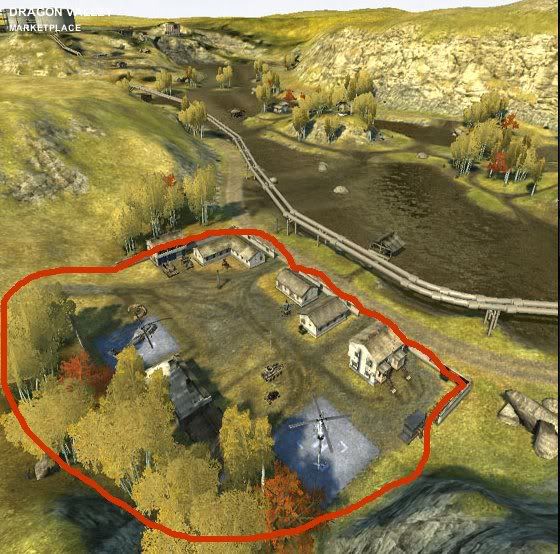
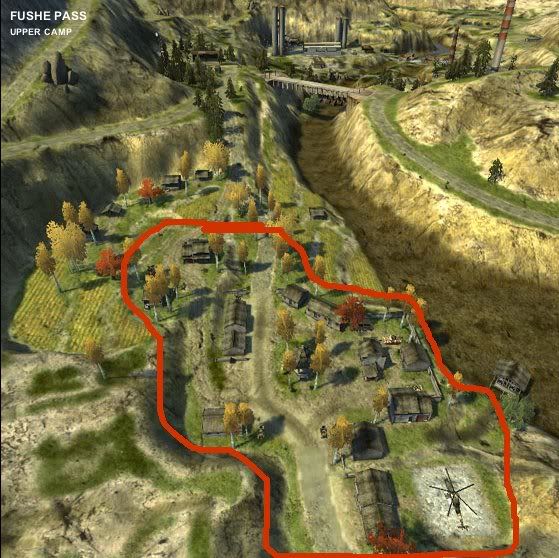
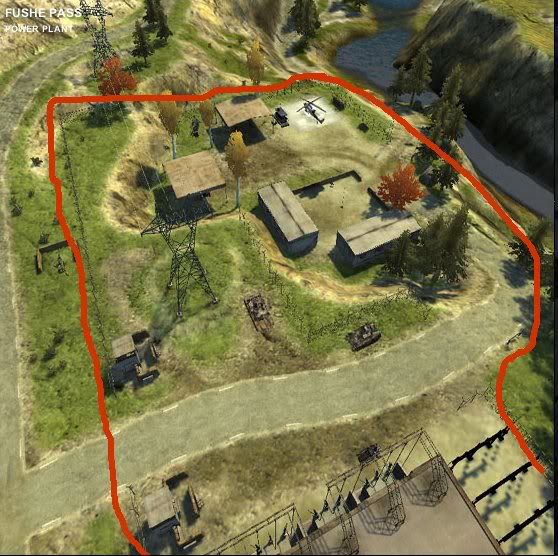
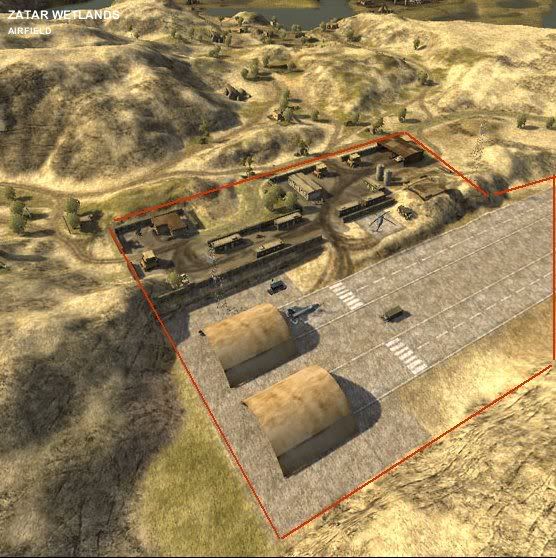
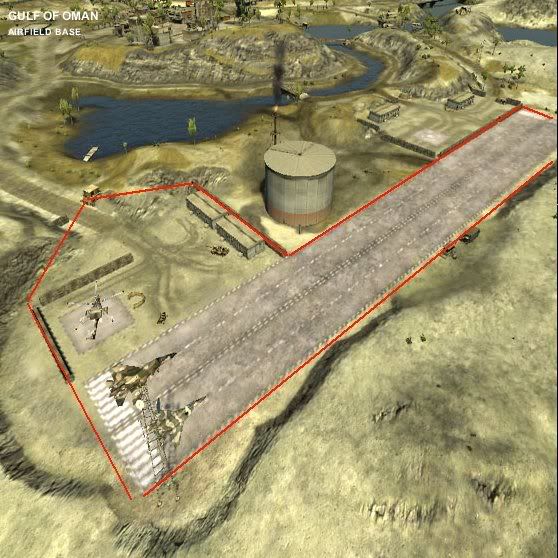
BaseRape Robežas!!!


#7
-
- Пользователи
-
- 115 сообщений
Спец. Джоунин
-
Пол:Женщина
- Город:Latvia Rīga
Отправлено 18 January 2011 - 16:51


#8
-
- Пользователи
-
- 115 сообщений
Спец. Джоунин
-
Пол:Женщина
- Город:Latvia Rīga
#9
-
- Пользователи
-
- 115 сообщений
Спец. Джоунин
-
Пол:Женщина
- Город:Latvia Rīga
Отправлено 22 January 2011 - 00:20
Fixing all pb issues
1 - open the windows explorer and go to 'C: \ Program Files \ EA GAMES \ Battlefield 2' and create a folder with the name '! Bkp-bp'
2 - go to 'C: \ Program Files \ EA GAMES \ Battlefield 2 \ pb', copy the files
pbags.dll
pbcl.dll
pbclold.dll
pbcls.dll
pbsv.dll
and paste them in the folder that you created, '! bkp-bp'.
3 - you can download from a pbsvc.exe
http://www.evenbalan...pbsvc/pbsvc.exe
* steps 1, 2 and 3 will be made only once. the other will be made whenever you play for, before the opening game.
4 - open the program pbsvc.exe
5 - select the "Un-Install/Remove PunkBuster Service 'and click next, then finish.
6 - go to 'C: \ Program Files \ EA GAMES \ Battlefield 2 \ pb', and delete all the files it has within it, the root (only the files, not folders' dll ',' htm 'and' scrnshot ')
7 - go to the folder 'dll' (C: \ Program Files \ EA GAMES \ Battlefield 2 \ bp \ dll) and delete the files that are inside (must be two files with the extension. Dll, but if you have more , Delete without fear).
8 - go to the folder 'htm' (C: \ Program Files \ EA GAMES \ Battlefield 2 \ bp \ htm) and delete the files that exist beyond these, the words, those listed below are those that are:
la001310.htm (not delete this)
lc001110.htm (not delete this)
ma001310.htm (not delete this)
mc001110.htm (not delete this)
wa001310.htm (not delete this)
wc001110.htm (not delete this)
this seems complicated, but it is not. these six files. htm listed above are installed from the CD of the battlefield, the others are updates of punkbuster. then, the files you will delete (in my case are always two files), have recent dates. and those listed here are former date.
9 - cut the dll files in the folder 'bkp-bp' and paste them in the folder 'pb' (C: \ Program Files \ EA GAMES \ Battlefield 2 \ pb)
1 - open the windows explorer and go to 'C: \ Program Files \ EA GAMES \ Battlefield 2' and create a folder with the name '! Bkp-bp'
2 - go to 'C: \ Program Files \ EA GAMES \ Battlefield 2 \ pb', copy the files
pbags.dll
pbcl.dll
pbclold.dll
pbcls.dll
pbsv.dll
and paste them in the folder that you created, '! bkp-bp'.
3 - you can download from a pbsvc.exe
http://www.evenbalan...pbsvc/pbsvc.exe
* steps 1, 2 and 3 will be made only once. the other will be made whenever you play for, before the opening game.
4 - open the program pbsvc.exe
5 - select the "Un-Install/Remove PunkBuster Service 'and click next, then finish.
6 - go to 'C: \ Program Files \ EA GAMES \ Battlefield 2 \ pb', and delete all the files it has within it, the root (only the files, not folders' dll ',' htm 'and' scrnshot ')
7 - go to the folder 'dll' (C: \ Program Files \ EA GAMES \ Battlefield 2 \ bp \ dll) and delete the files that are inside (must be two files with the extension. Dll, but if you have more , Delete without fear).
8 - go to the folder 'htm' (C: \ Program Files \ EA GAMES \ Battlefield 2 \ bp \ htm) and delete the files that exist beyond these, the words, those listed below are those that are:
la001310.htm (not delete this)
lc001110.htm (not delete this)
ma001310.htm (not delete this)
mc001110.htm (not delete this)
wa001310.htm (not delete this)
wc001110.htm (not delete this)
this seems complicated, but it is not. these six files. htm listed above are installed from the CD of the battlefield, the others are updates of punkbuster. then, the files you will delete (in my case are always two files), have recent dates. and those listed here are former date.
9 - cut the dll files in the folder 'bkp-bp' and paste them in the folder 'pb' (C: \ Program Files \ EA GAMES \ Battlefield 2 \ pb)
#10
-
- Пользователи
-
- 115 сообщений
Спец. Джоунин
-
Пол:Женщина
- Город:Latvia Rīga
Отправлено 22 January 2011 - 00:22
Fixing problem with PnkBstrB.exe
This is a guide for how to fix the problem with PnkBstrB.exe which a lot of ppl experience having problems with after PB have update their system..
NOTE: This can also be used for other games than COD4..
First of all:
- Go to punkbuster.com and find your game, and manually download the files on there
If that doesn't work:
- Go to http://www.evenbalance.com/ and download Pbsetup ( or press this link ) install, add your game, and click update punkbuster for this game
If this doesn't work either:
- Go to http://www.evenbalance.com/ and download PBSVC.exe ( or press this link ) and install.
Now press:
Ctrl+Alt+Delete
Go into processes
Find punkbuster, and shut it down
(There MAY not be a process running called PB, but check anyway)
Now run PBSVC.exe and choose: In/reinstall:
Now there's two options:
1) It says problem has been fixed (Haven't experienced this yet)
2) It says there's a mistake
If 1) then enjoy gaming
If 2) There's an entire new procedure to follow.
2.1) Make sure nothing is running that uses PB (fx. COD4 that u've minimized, PB in processes and so on)
2.2) Now open PBSVC and choose: Uninstall Punkbuster
Press this link for large image size
2.3) Go to your System 32 folder, and find the files called PnkBstrA and PnkBstrB -> Delete them
2.4) Make sure that your PB folder is deleted in the game that are making problems, ex: ...\COD4\PB
2.5) Now download CC Cleaner, Install and run it..
Go down into Registry
Search the registry, and clean what it finds..
Do this 3 times or untill it doesn't show any things that can be cleaned
2.6) Reboot your computer
2.7) Now open PBSVC again, and use: Install Punkbuster (Uninstall shouldn't be avaible to choose)
Let it install..
2.8 ) Open your game and log on to a server..
2.9)
2.9a) Either the game work and you are ready to go
2.9b) It still doesnt work, and you therefore contact me on one of the following methods written below..
This is a guide for how to fix the problem with PnkBstrB.exe which a lot of ppl experience having problems with after PB have update their system..
NOTE: This can also be used for other games than COD4..
First of all:
- Go to punkbuster.com and find your game, and manually download the files on there
If that doesn't work:
- Go to http://www.evenbalance.com/ and download Pbsetup ( or press this link ) install, add your game, and click update punkbuster for this game
If this doesn't work either:
- Go to http://www.evenbalance.com/ and download PBSVC.exe ( or press this link ) and install.
Now press:
Ctrl+Alt+Delete
Go into processes
Find punkbuster, and shut it down
(There MAY not be a process running called PB, but check anyway)
Now run PBSVC.exe and choose: In/reinstall:
Now there's two options:
1) It says problem has been fixed (Haven't experienced this yet)
2) It says there's a mistake
If 1) then enjoy gaming
If 2) There's an entire new procedure to follow.
2.1) Make sure nothing is running that uses PB (fx. COD4 that u've minimized, PB in processes and so on)
2.2) Now open PBSVC and choose: Uninstall Punkbuster
Press this link for large image size
2.3) Go to your System 32 folder, and find the files called PnkBstrA and PnkBstrB -> Delete them
2.4) Make sure that your PB folder is deleted in the game that are making problems, ex: ...\COD4\PB
2.5) Now download CC Cleaner, Install and run it..
Go down into Registry
Search the registry, and clean what it finds..
Do this 3 times or untill it doesn't show any things that can be cleaned
2.6) Reboot your computer
2.7) Now open PBSVC again, and use: Install Punkbuster (Uninstall shouldn't be avaible to choose)
Let it install..
2.8 ) Open your game and log on to a server..
2.9)
2.9a) Either the game work and you are ready to go
2.9b) It still doesnt work, and you therefore contact me on one of the following methods written below..
#11
-
- Пользователи
-
- 32 сообщений
Генин
-
Пол:Мужчина

- Город:Украина, Алчевск
Отправлено 05 February 2011 - 00:48
че все темы закрыты блин ? Скачал клиент, установил 1.50 версию, обнови папу бустера и в итоге при конекте к серваку пишет: Извени чувак, у тебя ключик не валидный =\ Фак вообще не какой, хрен поймешь как устранять те или иные проблемы, не судьба фак написать в стиле Вопрос \ Ответ ?
#12
-
- Пользователи
-
- 16 сообщений
Генин
-
Пол:Мужчина
- Город:Moscow city
Отправлено 05 February 2011 - 10:40
Bel (05 February 2011 - 00:48) писал:
че все темы закрыты блин ? Скачал клиент, установил 1.50 версию, обнови папу бустера и в итоге при конекте к серваку пишет: Извени чувак, у тебя ключик не валидный =\ Фак вообще не какой, хрен поймешь как устранять те или иные проблемы, не судьба фак написать в стиле Вопрос \ Ответ ?
#13
-

- Пользователи
-
- 65 сообщений
Чунин
Отправлено 19 February 2011 - 00:11
Вот пару недель бегаю бегаю, а экспы нет( и как-то не мило бегать в рядовых... ни пушек ни медалек
#14
-

- V.I.P.
-

- 2373 сообщений
Санин
-
Пол:Мужчина
- Город:Москоу сити! А точнее Выхино папа! ^_^
Отправлено 19 February 2011 - 00:42
Bel: смени сиди кей через реестр на другой, мне помогло :)
#15
-
- Пользователи
-
- 65 сообщений
Чунин
Отправлено 22 February 2011 - 01:47
и возвращаясь к вопросу.......... как рейты, экспу, регалии получать????????????
3 аккаунта уже для тестав есть и куй зеленый и нифига не бобов нет
3 аккаунта уже для тестав есть и куй зеленый и нифига не бобов нет
#16
-
- V.I.P.
-
- 2373 сообщений
Санин
-
Пол:Мужчина
- Город:Москоу сити! А точнее Выхино папа! ^_^
Отправлено 22 February 2011 - 06:35
Axel_F: этого, вроде (сам сейчас в Бэд Компани играю), ничего нет, пока, обещались что позже будет ))
#17
-
- Пользователи
-
- 115 сообщений
Спец. Джоунин
-
Пол:Женщина
- Город:Latvia Rīga
Отправлено 23 February 2011 - 20:23
Axel_F (22 February 2011 - 01:47) писал:
и возвращаясь к вопросу.......... как рейты, экспу, регалии получать????????????
3 аккаунта уже для тестав есть и куй зеленый и нифига не бобов нет
3 аккаунта уже для тестав есть и куй зеленый и нифига не бобов нет
Po moimu ti ne dognal 4to to private ranked server ( et zna4et ne off server a odelnij ot nih ne global a private) i stata tolko na etogo servera i ne uvide6 ti svoi stati na bfhq :P
Na www.bf2.lv starice mowna stati posmoretj (tam pokazivaet inogda viletae na mits.lv no zaidi popowee budet www.bf2.lv)
#18
-
- V.I.P.
-
- 2373 сообщений
Санин
-
Пол:Мужчина
- Город:Москоу сити! А точнее Выхино папа! ^_^
Отправлено 24 February 2011 - 00:23
MazaCaka: ну он скорее всего имеет в виду где именно все что должно быть (на сколько я знаю, оружия и другая хурма должна открываться и на неофф. серверах).
#19
-
- Пользователи
-
- 115 сообщений
Спец. Джоунин
-
Пол:Женщина
- Город:Latvia Rīga
Отправлено 24 February 2011 - 11:37
CrowL1nG (24 February 2011 - 00:23) писал:
MazaCaka: ну он скорее всего имеет в виду где именно все что должно быть (на сколько я знаю, оружия и другая хурма должна открываться и на неофф. серверах).
Nu raz ti vsjo tak prekrasno znae6 to ti dolwen znatj i to 4to netu poka launchera kotorij otkrivaet anloki,a gde dostatj rabo4ij starij dawe ja ne znajo i winda u menja tokaja 4to u menja oni vse nerabotajot dawe kotorij spec dlja menja zdelani :D
#20
-

- Пользователи
-
- 0 сообщений
Студент академии
Отправлено 24 February 2011 - 12:47
Для работы статистики и анлоков нужно:
- в папке C:\WINDOWS\system32\drivers\etc\ создать файл hosts.ics и вписать в него строку: 217.199.111.15 bf2web.gamespy.com
Если там уже такой файл есть, то откройте его и поглядите, нет ли там такой строчки с другим IP.
Если есть то измените на 217.199.111.15
- в папке C:\WINDOWS\system32\drivers\etc\ создать файл hosts.ics и вписать в него строку: 217.199.111.15 bf2web.gamespy.com
Если там уже такой файл есть, то откройте его и поглядите, нет ли там такой строчки с другим IP.
Если есть то измените на 217.199.111.15


Количество пользователей, читающих эту тему: 1
0 пользователей, 1 гостей, 0 скрытых пользователей

